The 5 Best Online Community Platforms for 2027 [17 Reviewed]
Looking for the best online community platform? We’ve reviewed 17 platforms and picked the 5 best for building engaged communities, selling memberships and courses, and bringing everything together in one place.
Martine Hammar
October 19, 2026
Building a successful online community is about more than giving people somewhere to post updates. It’s about creating a space where people can connect, share ideas, learn from each other and feel like they belong.
And as AI makes more of our online experiences automated, genuine human connection is becoming more valuable, not less.
The right community platform makes it easier to bring people together, keep them engaged, and build a thriving community without juggling multiple tools. In this guide, we’ve reviewed 17 of the best online community platforms to help you find the right one for your business.
Quick answer: the best online community platforms in 2027
Best overall and best for video:Swarm, from $19/month billed yearly
Best for professional communities: Circle, from $89/month billed yearly
Best for course creators: Mighty Networks, from $79/month billed yearly
Best for simple community and courses: Skool, from $9/month
Best for AI-powered learning: Disco, from $399/month billed yearly
Our pick: Swarm - a video-first community platform for coaches, creators and experts. Members can reply with video, voice or text, and your courses, events, live streams, memberships and payments all live in one place.
Plans start at $19 a month billed yearly, and the Scale plan ($149 a month billed yearly) adds white labeling and your own branded app.
An online community platform is a digital space where people with shared interests, goals or experiences can connect, communicate and share content. Unlike social media platforms such as Facebook or LinkedIn, dedicated community platforms give businesses and creators more control over the experience, branding, members and content.
They can include features such as discussions, messaging, events, courses, video, live streaming and memberships, giving you everything you need to build an engaged community in one place.
Why are online communities important?
People want to feel connected. A well-run online community gives members a place to ask questions, share experiences, learn from others and build genuine relationships, helping drive community engagement.
For businesses, communities can also create stronger relationships with customers, increase engagement and turn members into loyal advocates. And as more online content becomes automated by AI, creating spaces where people can connect with other real people is becoming increasingly valuable.
How video boosts community engagement
Video makes online communities feel more personal. Seeing and hearing the people behind the posts creates a stronger sense of connection than text alone, helping members feel like they are interacting with real people rather than simply consuming content.
Video can be used for everything from member introductions and educational content to live events, announcements and discussions. It can also make communities more accessible and engaging, particularly when features such as captions and transcripts are available.
For community owners, the key is choosing a platform where video is built into the experience. If you're interested in taking this approach further, this guide to video-first communities explains how to build a more engaging community around video.
How to choose the best online community platform
There are plenty of community platforms to choose from, but the right one depends on what you're trying to build. Before choosing a platform, consider:
Ease of use: Is it simple for both you and your members to navigate and use?
Engagement: Does it offer the tools you need to encourage discussion, participation and interaction?
Content and communication: Look for the features you need, such as video, messaging, courses, events, live streaming and discussions.
Branding and customization: Can you create an experience that feels like your community rather than another social media group?
Monetization: If you plan to charge for access, check whether the platform supports paid memberships, courses or other revenue streams.
Integrations and scalability: Consider whether it connects with the other tools you use and whether it can grow with your community.
The 5 Best Online Community Platforms
Now that you’ve decided that creating an online community is beneficial, where do you begin? Below are 5 of the best online community platforms that you can use to start creating your own community.
Best for: Coaches, creators, experts and businesses that want to build an engaging community around video, courses, events and memberships.
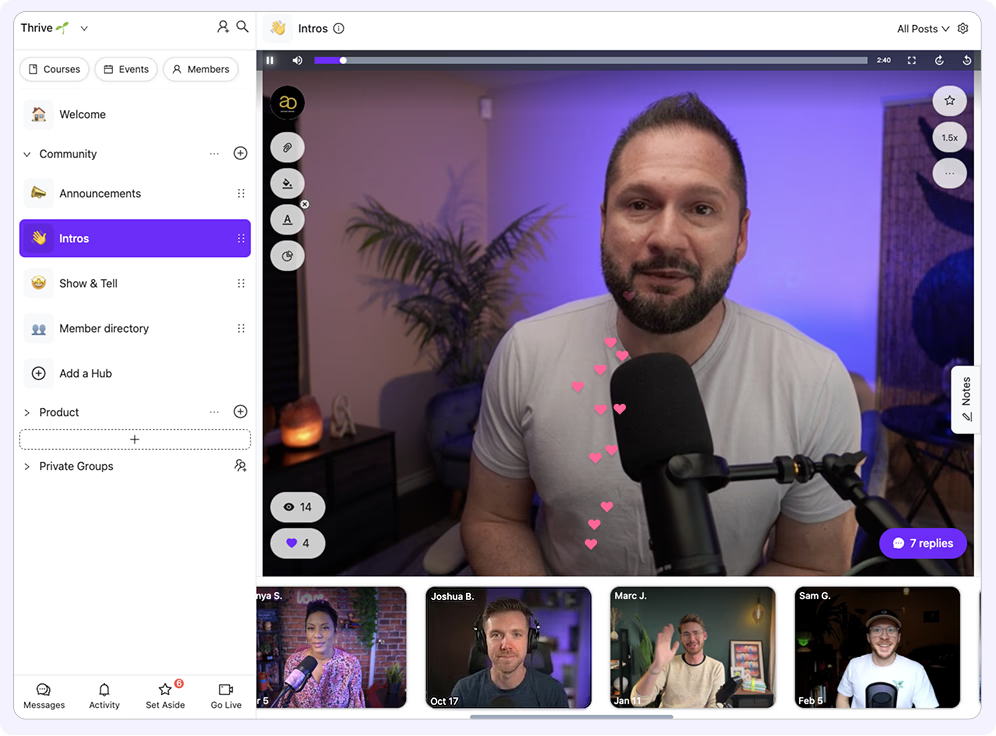
Swarm is a video-first community platform designed to make online communities feel more personal and interactive. Instead of treating video as something you simply upload alongside your community, Swarm puts video, voice and text directly into conversations, so members can respond in whatever format feels natural to them.
Alongside community discussions, Swarm includes courses, events, live streaming, memberships and a built-in digital store. This means you can run a paid membership, deliver courses, host live sessions and build a community without stitching together several different platforms.
Why we like Swarm
Video, voice and text conversations in the same community
Video replies and personal video messages
Courses with video, text, PDFs, quizzes and certificates
Live events and live streaming with recordings
Multiple spaces for organizing different communities, courses or groups
Engage with members in groups or 1:1
Multi-tier memberships
Create a branded digital store to sell your products
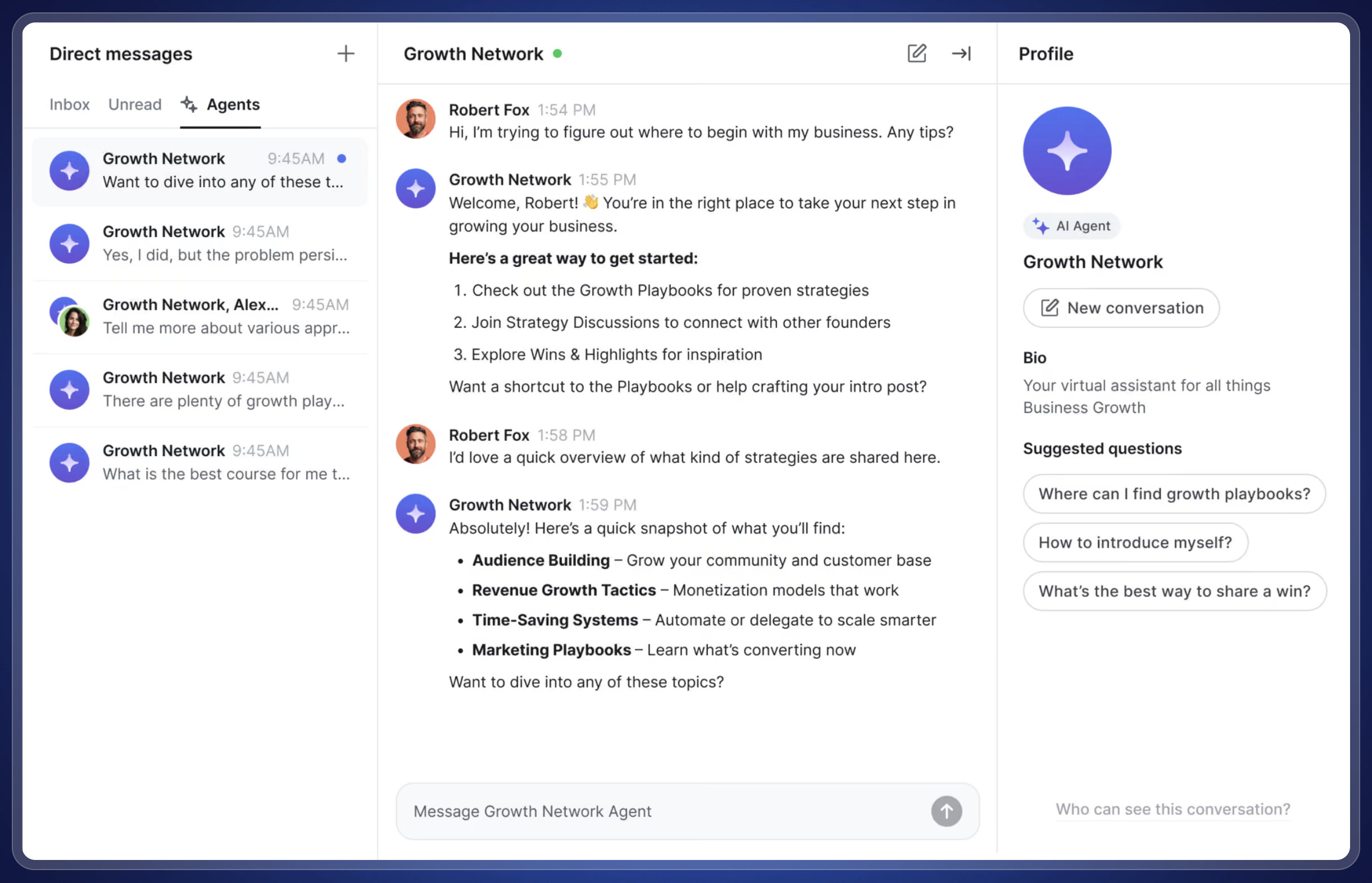
AI tools including transcripts, summaries and response assistance
Search across community content
Zapier, API and SSO integrations on Scale
White-label community and branded mobile app on Scale
14-day free trial with no credit card required
Where Swarm stands out
The biggest difference between Swarm and many community platforms is its approach to video.
Most platforms are fundamentally built around text, with video added as a content format. Swarm takes a different approach, using video as part of the way members actually communicate. A coach can answer a question with a video, a member can share their progress on camera, and other members can respond with video, voice or text.
That makes particular sense for coaches and experts whose work depends on demonstrating skills or building a personal connection. A fitness coach can review someone's technique, a language teacher can respond to a student's pronunciation, or a business coach can give feedback without needing to schedule a live call.
Swarm also brings the rest of the experience together. Courses, community discussions, events, memberships and payments can all live in the same place, rather than sending members between separate tools.
Plans and Pricing
Swarm offers three plans, with lower prices when billed annually. All plans include unlimited video, voice, courses and events, although limits on live sessions, members and other features vary by plan.
The Launch Plan Price: $19/month billed annually or $29/month billed monthly The Launch plan supports up to 1,000 members and one space. It includes unlimited video and voice messages, courses and events, multi-tier memberships, a branded digital store and live streaming. Live streams can run for up to 30 minutes per session, and videos are available in SD. There is a 5% transaction fee on sales.
The Growth Plan Price: $79/month billed annually or $89/month billed monthly The Growth plan supports up to 5,000 members and five spaces. It adds higher live-streaming limits (live streams of up to 1 hour per session), live-stream recordings, HD videos, and 0% transaction fees.
The Scale Plan Price: $149/month billed annually or $199/month billed monthly The Scale plan is designed for larger or more premium communities, with unlimited members and Spaces. It includes full white labeling, a branded mobile app, Full HD video, unlimited admins and moderators, Zapier, API access and SSO, with live streams of up to 90 minutes per session and 0% transaction fees.
They also offer custom plans if you have specific requirements.
Verdict
Swarm is a strong option if you want your community to feel like more than a collection of text posts. Its biggest differentiator is the way video is built into everyday communication, rather than being treated simply as another type of content.
It's particularly well suited to coaches, creators and experts whose businesses depend on teaching, demonstrating skills or building personal relationships with members. And because courses, events, memberships and payments are all built in, you can run the whole experience from one platform.
Don't just take my word for it, though. Here is an independent review from another creator:
If you're looking to build a genuinely engaging, video-first community, Swarm brings your community, content and monetization together in one place.
2. Circle - Best for Professional Communities
Best for: Businesses, creators and community managers who want a polished, structured platform for memberships, courses and professional communities.
Circle is one of the more established community platforms, and it has evolved into a comprehensive all-in-one platform for building, managing and monetizing online communities. It combines discussions, courses, events, live streams, memberships, payments and website tools in one place, so there is plenty here for businesses that want to build a more structured community experience.
It also offers a polished interface, searchable member directory, gamification and a range of AI and automation tools. The result is a platform that feels particularly well suited to professional communities, course businesses and creators who want plenty of control over how their community is organized.
Why we like Circle
Clean, professional community interface
Courses, community and memberships in one platform
Live streams and live rooms
Events and member-hosted sessions
Paid memberships and subscriptions
Custom domain and branding
Searchable member directory
Gamification features
iOS, Android and desktop apps
Website builder
AI tools and automation
Workflows on the Business plan
API access on Business and above
Branded email notifications on Business and above
Custom branded apps available through Circle Plus
Where Circle stands out
Circle's biggest strength is the breadth of its platform. It has clearly been designed to handle much more than a basic discussion forum, bringing community, courses, events, payments and content into one ecosystem.
Its course functionality is particularly strong. You can combine course content with discussions, direct messaging, live Q&As, coaching sessions and gamification, which makes Circle a good fit for businesses where the community is closely connected to a learning experience.
Circle has also invested heavily in live video. Professional and above includes live streams and live rooms, with options for co-hosts, moderators, Q&A and recordings. Members can even be allowed to host their own live sessions.
Where it differs from a video-first platform like Swarm is that Circle's video is primarily one part of a broader community platform. If video is central to how your members communicate with each other, that's an important distinction to consider.
Plans and Pricing
Circle offers a 14-day free trial with no credit card required. Pricing is based on the level of community management, automation and customization you need.
The Professional Plan Price: $89/month billed annually The Professional plan includes unlimited members, community discussions, courses, live events, a website, member directory, analytics, payments, gamification, custom domains and Circle's iOS, Android and desktop apps.
The Business Plan Price: $199/month billed annually The Business plan adds workflows, custom profile fields, Circle APIs and MCP, activity scores, branded email notifications, content co-pilot, automated transcriptions and the ability to remove Circle branding.
The Scale Plan $419/month billed annually The Scale plan adds higher limits and more advanced automation, including AI agents and unlimited workflows. Circle also offers Circle Plus with custom pricing for businesses that need additional services and a fully branded mobile app.
Verdict
Circle is a well-rounded community platform with a particularly strong set of tools for businesses that want to combine community, courses, memberships and events. Its polished interface and extensive feature set make it a good option for professional communities and course-based businesses.
The main thing to consider is how important video is to your community. Circle has impressive live video capabilities, but video isn't as central to everyday member-to-member communication as it is with a video-first platform.
3. Mighty Networks - Best for Course Creators
Best for: Course creators, coaches and businesses that want to combine an online community with courses, events and memberships.
Mighty Networks is an established community platform that combines community spaces with courses, events, memberships and live experiences. It has a visual, relatively straightforward interface and gives community owners plenty of control over how their spaces are organized.
The platform is particularly well suited to creators and educators who want to build a community around a course or membership. You can create different spaces for discussions, courses, events and premium groups, while members can access the community through web, iOS and Android.
The experience on Mighty Networks is heavily geared towards mobile, which may not suit communities where members prefer to engage on desktop.
Why we like Mighty Networks
Community spaces with discussions and activity feeds
Courses and resource libraries
Native live streaming and video
Events and event management
Premium groups and memberships
Rich member profiles
Member tags and badges
Analytics and reporting
Native iOS and Android apps
Custom domains and branding
AI-powered features
Integrations with tools such as Zapier
Unlimited members on all plans
Where Mighty Networks stands out
Mighty Networks has a strong focus on making communities part of members' everyday lives, with native iOS and Android apps at the heart of the experience. The company says that 60% more activity happens on mobile than on the web, which reflects how heavily the platform prioritizes mobile engagement.
This can be a real advantage for communities where members primarily want to check in, join discussions, respond to questions and interact with other members from their phones.
However, that mobile-first approach isn't necessarily ideal for everyone. If your community involves a lot of longer-form reading, course work, content creation or managing resources, some members may prefer a more desktop-focused experience. Mighty does have a web version, but its native mobile apps are clearly a major part of its product strategy.
Its other major strength is the combination of community and courses. You can build courses, discussions, events and memberships into the same community rather than sending members between several different platforms. That's particularly useful for coaches, educators and creators who want their course to become the foundation for an ongoing membership community.
Plans and Pricing
Mighty Networks offers several plans, with pricing and feature limits varying depending on the plan. Plans include a free trial.
Launch Plan Price: $79/month billed annually or $95/month billed monthly Includes the AI Cohost, community, courses and basic automations.
Scale Plan Price: $179/month billed annually or $215/month billed monthly Adds more automations, APIs and MCP access, and third-party integrations.
Growth Plan Price: $354/month billed annually or $425/month billed monthly Adds advanced automations, growth expert sessions, priority support and migration services.
Mighty Pro Price: Custom pricing Includes custom branded apps and full community services.
Mighty Networks also offers Mighty Pro, its higher-end option for businesses that want a more fully branded experience. Pricing is available on request.
Verdict
Mighty Networks is a strong choice for creators and businesses that want to combine a community with structured educational content. Its course functionality is one of its biggest strengths, particularly for coaches and educators who want their members to learn, interact and continue the conversation in the same place.
It also offers a broad range of community features, including events, live streaming, memberships, messaging and mobile apps, making it a comprehensive platform for building a paid or free community.
If courses are a central part of your community, Mighty Networks provides a particularly well-integrated way to bring the two together.
4. Skool - Best for Simple Community and Course Management
Best for: Coaches, course creators and entrepreneurs who want a straightforward community platform with courses, events and built-in gamification.
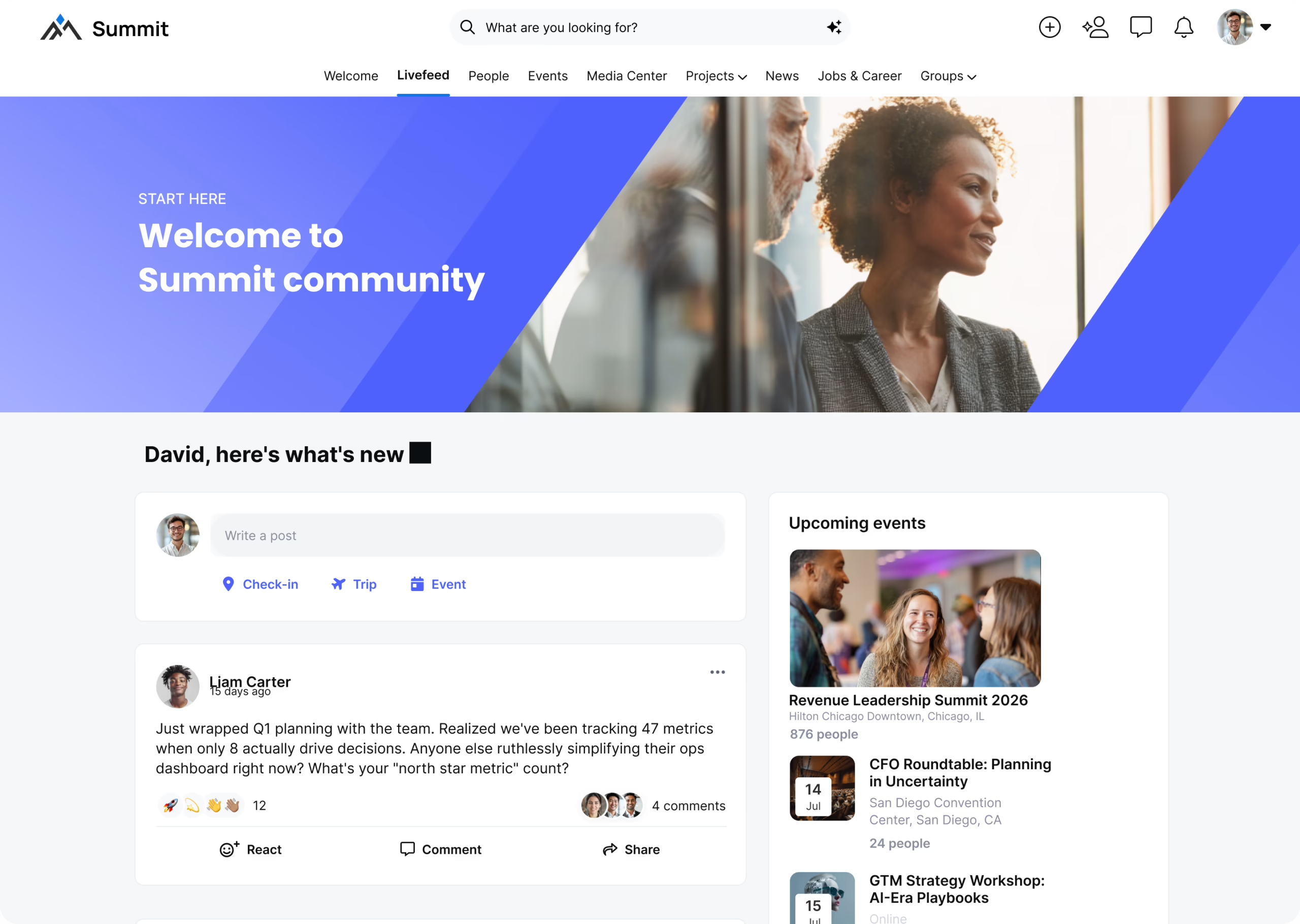
Skool is a community and course platform designed to bring discussions, learning and events together in one place. It has a very distinctive interface, with the community feed, classroom, calendar and leaderboard all forming part of the core experience.
My first impression of Skool was that it felt very busy and slightly overwhelming. There is a lot happening on screen, and the combination of posts, categories, points, levels, the leaderboard, courses and events can take a little while to get used to. It's a very functional interface, but it isn't necessarily the cleanest or most visually calming community experience.
Once you understand how everything fits together, however, Skool is relatively simple to use. Its deliberately focused approach means there aren't hundreds of settings or complicated configuration options to work through.
Why we like Skool
Simple, straightforward pricing
Unlimited members and courses
Community feed designed to encourage regular engagement
Points, levels and leaderboards for gamification
Built-in classroom for courses and resources
Events and calendar
Live calls
Native video hosting
Polls and community discussions
Custom URLs
Built-in payments and memberships
Affiliate functionality
No complicated tiered feature structure on the Pro plan
Where Skool stands out
Skool's biggest strength is its simplicity of structure. Rather than trying to be an all-purpose platform with dozens of different tools, it focuses on a few core elements: community, courses, events and gamification.
The leaderboard is particularly central to the experience. Members earn points through their activity, giving people an incentive to participate rather than simply consume content. For communities built around coaching, masterminds or learning, this can be an effective way of encouraging members to show up regularly.
The platform also keeps pricing refreshingly straightforward. There are currently just two plans, and both allow unlimited members, courses, videos and live calls. The main difference is the price and transaction fee, rather than having to work through a long list of feature restrictions.
The trade-off is that this focused approach also means Skool isn't the most sophisticated or customizable community platform. The interface can feel quite busy, particularly when you first arrive, and the gamification elements won't appeal to every type of community.
Plans and Pricing
Skool currently offers two plans, both with a 14-day free trial.
Hobby Plan Price: $9/month Includes unlimited members, unlimited courses, unlimited videos, unlimited live calls, a custom URL and affiliate features. The transaction fee is 10%.
Pro Plan Price: $99/month Includes the same core features, with unlimited members, courses, videos and live calls, but reduces the transaction fee to 2.9%. The Pro plan also provides additional branding and community management features.
Verdict
Skool is a straightforward community platform that combines courses, discussions, events and gamification without trying to do too much.
Its biggest advantage is also its biggest limitation. The focused feature set makes it relatively easy to understand once you're familiar with the interface, but the busy layout and strong emphasis on points, levels and leaderboards can make the experience feel overwhelming at first.
It's particularly well suited to coaches, course creators and mastermind communities where regular participation and interaction are important. For businesses looking for a highly branded, visually polished or more flexible community experience, however, Skool may feel restrictive.
5. Disco - Best for AI-Powered Learning Communities
Best for: Training businesses, academies and organizations that want to combine courses, community, events and AI-powered learning tools.
Disco is an AI-powered community and learning platform designed to bring courses, communities and events together in one place. Rather than focusing primarily on social interaction, Disco is built around structured learning, making it particularly well suited to training businesses, professional education and organizations running more formal learning programs.
AI is a major part of the platform. Disco can help with creating learning programs, answering member questions, automating workflows and analyzing engagement. This makes it particularly interesting for organizations that want to use AI to reduce the amount of manual work involved in running a learning community.
Why we like Disco
Courses and learning programs
Community discussions and chat
Live events
Groups and subgroups
AI-powered learning program creation
Ask AI for member questions
Automated workflows and notifications
Reporting and engagement analytics
Video hosting with automatic transcription
AI can reference content from uploaded videos
iOS and Android apps
Branded learning environment
Integrations and API capabilities on higher-tier plans
Tools designed specifically for education and training
Where Disco stands out
Disco's biggest strength is the way it combines structured learning with community. Rather than simply giving you a community with the option to add courses, the platform is designed around the idea that learning, interaction and events should all be part of the same experience.
Its AI tools are also more deeply integrated into the learning experience than you might find on a traditional community platform. AI can help create learning programs, answer questions using your content and automate parts of the member journey.
Video is another useful part of the platform. You can upload lessons, webinars and other video content, with automatic transcription making that content easier to search and use with Disco's AI tools.
The trade-off is that Disco is quite specifically focused on learning and education. If you're building a more general-purpose community where the main goal is conversation, networking or social interaction, some of its learning-focused functionality may be more than you need.
Plans and Pricing
Disco's pricing is aimed primarily at organizations running professional learning and community programs. Pricing varies depending on the plan and billing arrangement.
Organization Plan Price: $399/month billed annually or $499/month billed monthly Supports up to 500 members and includes a branded learning environment, courses, events, AI tools, onboarding and access to office hours.
Enterprise Plan Price: Custom pricing Designed for larger organizations and communities, with support for 100,000+ members, custom-branded mobile apps, API and webhooks, SAML SSO, dedicated support and personalized onboarding and migration.
Verdict
Disco is a strong option for organizations that see their community as part of a wider learning experience. Its combination of courses, community, events and AI tools makes it particularly well suited to training businesses, professional education providers and virtual academies.
Its biggest differentiator is the depth of its learning functionality and the way AI is integrated throughout the platform. However, that focus also means it may be more platform than you need if you're primarily looking to create a straightforward social community.
For organizations where learning is at the heart of the community, Disco is one of the more specialized options in this list.
Best for: Businesses that want a highly customizable community that can be integrated into an existing website or product.
Bettermode is a flexible community platform that gives businesses a lot of control over how their community looks and works. You can build different Spaces for discussions, Q&A, events, knowledge bases and product updates, while its integrations and developer tools make it particularly suited to businesses that want to connect their community with other tools.
Why we like Bettermode
Highly customizable layouts and branding
Templates to help you get started
Spaces for different types of content
Good range of integrations
Reactions, upvotes and tagging
Moderation tools
Embedding options for websites and products
Developer tools for creating custom functionality
Where Bettermode stands out
Bettermode's biggest strength is flexibility. Its block-based approach gives businesses plenty of control over the look and structure of their community, while integrations and developer tools make it possible to build a more customized experience.
The main limitation is video. Video can be embedded or uploaded, but it isn't really part of the core community experience. If video is an important way for members to communicate with each other, Bettermode feels more like a traditional text-first community platform.
Plans and Pricing
Bettermode offers paid plans with a 14-day trial. Pricing varies by plan and billing period.
Starter Plan: $149/month billed yearly ($1,788 a year), or $199/month billed monthly. Supports up to 10,000 members and 5 collaborators, and includes a custom domain and the option to remove "Powered by Bettermode".
Growth Plan: $1,500/month billed yearly ($18,000 a year), or $1,750/month billed monthly.
Verdict
Bettermode is a good option for businesses that value customization and integrations, particularly if they want to embed their community into an existing website or product.
Its flexibility is a real strength, but its video capabilities are limited compared with platforms built around richer, more interactive communication.
Facebook Groups - Best for Starting a Free Community
Best for: Businesses, creators and organizations that want to build a community quickly using a platform their members already know.
Facebook might seem like the obvious place to launch a community. Facebook already has a huge user base, so there is very little friction for members joining and participating.
Facebook Groups can work particularly well for smaller communities where the goal is to share updates, ask questions and have conversations. The problem comes as the community grows. Your content sits alongside everything else happening on Facebook, and the algorithm decides what members see rather than giving you complete control over how your content is surfaced.
Why we like Facebook Groups
Free to create and use
Huge existing user base
Public, private and other group privacy options
Familiar interface for most members
Easy to share posts, images and video
Events can be connected to your group
Members can interact using their existing Facebook profiles
Where Facebook Groups falls short
The biggest problem with Facebook Groups is noise. Members aren't just visiting your community. They're also seeing posts from friends, pages, notifications, ads and an endless stream of other content.
The algorithm also determines which posts members see and when they see them. This can make it harder for community managers to consistently reach their members, particularly as the group grows.
There's also the question of ownership. Your community exists inside Facebook's ecosystem, so you don't have the same control over the member experience, branding, data or platform as you would with a dedicated community platform.
For a small community, these compromises may be perfectly acceptable. But if your community is becoming an important part of your business, the lack of control can become increasingly frustrating.
Plans and Pricing
Facebook Groups are free to create and use. However, Facebook's wider platform includes advertising and other content that members will see alongside your community.
Verdict
Facebook Groups are a convenient way to get a community started, particularly when your members are already using Facebook. They're free, familiar and require very little setup.
The downside is that you're building your community inside someone else's platform. The algorithm, advertising, notifications and wider Facebook experience can create a lot of noise, while you have limited control over how members experience your content.
For a small community, Facebook Groups can work extremely well. For a community you want to build into a long-term asset, the lack of ownership and control becomes a much bigger consideration.
Slack - Best for Real-Time Conversations
Best for: Communities that are built around ongoing conversations, collaboration and quick interactions.
Slack is primarily a workplace communication platform, but it can also be used to create a community around shared interests, customers, courses or professional networks. If your members already use Slack, there is very little learning curve. They can join channels, send messages, share files and interact with each other without having to learn an entirely new platform.
Slack is particularly strong for real-time communication. Members can post text, share files, record audio and video clips, start video calls and use screen sharing. Channels can also be organized around different topics, while Slack Connect makes it possible to communicate with people outside your own organization.
Why we like Slack
Channels for organizing conversations by topic
Text, audio and video communication
Video and audio clips can be recorded directly in Slack
Huddles for quick conversations and brainstorming
Screen sharing
File sharing
Searchable conversations
Slack Connect for communicating with external organizations
Thousands of integrations
Familiar interface for people who already use Slack
Strong real-time communication
Where Slack stands out
Slack's biggest strength is real-time communication. It feels more like a conversation than a traditional community forum, which makes it particularly useful for professional communities where members need to ask questions, share ideas and get quick responses.
Its video features are also better than you might expect. Members can record audio and video clips directly within Slack, while huddles support live audio and video conversations with screen sharing. Paid plans support huddles with up to 50 participants, with up to 25 people able to have their video on at the same time.
The downside is that Slack was designed for work, not for building a branded community. That distinction becomes more noticeable as your community grows. There are lots of channels, notifications and conversations competing for attention, and members may already have several other Slack workspaces vying for their attention.
Plans and Pricing
Slack's pricing is based on active users, rather than giving you a fixed number of community members for one monthly fee. Slack defines an active user as someone who takes an action in the workspace during a 28-day period.
Free Plan Price: Free Includes 90 days of message history, up to 10 app integrations, audio and video clips, and 1:1 huddles.
Pro Plan Price: $7.25 per active user/month billed annually or $8.75 billed monthly Adds unlimited message history, unlimited integrations, group huddles, screen sharing for up to 50 people, Slack Connect and additional AI features.
Business+ Plan Price: $15 per active user/month billed annually or $18 billed monthly Adds more advanced AI features, enhanced identity management, SAML-based SSO and 24/7 support.
Enterprise+ Price: Contact Slack for pricing Designed for larger organizations with enterprise-level security, administration and AI requirements.
Verdict
Slack is a great communication tool, and for the right community it can work extremely well. It's particularly suited to professional communities where members value quick conversations, collaboration and real-time interaction.
The biggest issue is the pricing model. A price that looks inexpensive at first can become much more significant as your community grows because you're paying for active members rather than simply paying for the platform. For example, 500 active members on the Pro plan would work out at around $3,625 per month when billed annually.
There's also the question of distraction. Many members will already use Slack for work and may belong to multiple workspaces. Your community is therefore competing for attention with work messages, notifications and other Slack conversations. That can make it harder to create a focused community experience.
Slack is excellent for communication, but it's less compelling if your priority is building a dedicated, branded community that feels like its own destination.
Thinkific - Best for Course-Based Communities
Best for: Course creators, coaches and education businesses that want to combine online courses, memberships and community in one platform.
Thinkific is primarily known as an online course platform, but its community features make a lot of sense alongside its learning tools. Online courses can sometimes feel like a one-way experience, so adding a community gives students somewhere to ask questions, share their progress and connect with other learners.
The real strength is how closely Thinkific connects the two. You can link a community space to a specific course, automatically give students access based on their enrolment and even enable discussions alongside individual lessons. Communities can also be sold as standalone products or included as part of a membership.
Why we like Thinkific
Excellent integration between courses and community
Link community spaces directly to courses
Private spaces for specific courses or groups
Posts, comments, reactions and direct messaging
Live events and scheduled sessions
Member profiles and @mentions
Notifications and activity feeds
Sell community access separately or as part of a course or membership
Native mobile app with push notifications
Built-in payments and memberships
Strong course creation and learning tools
Community analytics and moderation tools
Where Thinkific stands out
Thinkific's biggest strength is the connection between learning and community. Rather than having a course hosted on one platform and your community somewhere else, you can bring the two experiences together.
For example, you could create a private community space for each course cohort, automatically give students access when they enrol and use the space for questions, discussion and peer support. You can also connect spaces directly to courses, so students can move between their learning content and the relevant community without having to find their way through a separate platform.
I also like the fact that Thinkific doesn't force you to make the community an add-on to a course. You can sell a community as a standalone product, bundle it with courses or include it as part of a wider membership.
The trade-off is that Thinkific is still fundamentally a learning platform. If your main goal is to build a highly social community where conversation is the primary experience, you may find it more structured than a dedicated community platform.
Plans and Pricing
Thinkific offers several plans, with pricing based on the features and level of functionality you need.
Free Plan Price: Free Thinkific's free plan is designed for getting started with its platform, although the available products and features are more limited than on the paid plans.
Basic Plan Price: $54/month or $40/month when billed annually Includes unlimited courses and access to Thinkific's community features.
Start Plan Price: $109/month or $82/month when billed annually Adds more advanced tools for growing a course and community business.
Grow Plan Price: $219/month or $164/month when billed annually Designed for more established businesses that need additional communities, spaces and administration capabilities.
Expand Plan Price: $499/month Thinkific's higher-tier plan for larger businesses and more advanced requirements.
Verdict
Thinkific is a particularly good choice if your community exists to support a learning experience. The ability to connect courses, community spaces, memberships and live events makes it much easier to create an ongoing experience rather than simply giving students access to a collection of lessons.
I also like that communities can be used in different ways. You can create a space for a particular course, build private groups around different cohorts or sell the community itself as a standalone product.
The downside is the price. Thinkific makes a lot of sense when you're already running a course or education business, but it can feel expensive if all you really want is a place for people to chat and connect. In that situation, you're paying for a much broader learning and commerce platform than you may actually need.
Thinkific is a great choice for course creators who want community to be part of the learning experience, rather than simply bolting a community onto an existing business.
Zapnito - Best for Enterprise Customer Communities
Best for: Large businesses and organizations that need a highly customized community for customers, professional networks or specialist audiences.
Zapnito is an enterprise community platform designed for organizations that want to create a branded space where customers, members or professional audiences can learn, share and connect. Rather than focusing primarily on casual social interaction, Zapnito puts a lot of emphasis on content, knowledge sharing, professional networking and managing larger communities.
The platform supports discussions, articles, events, courses, premium content, analytics, notifications and different types of community spaces. It can also be customized and integrated into a wider technology stack, making it particularly suited to businesses with more complex community requirements.
Why we like Zapnito
Highly customizable community experience
Strong content publishing tools
Private and open community spaces
Professional networking features
Events and courses
Community analytics
Premium content and monetization options
Custom integrations
Strong enterprise support
Multiple communities can be managed within one platform
Where Zapnito stands out
Zapnito is quite different from many of the other platforms on this list because it feels more like a content and knowledge hub with community built around it.
That can work particularly well for organizations that have a lot of expertise to share. You might use it to publish articles, research, reports or other premium content, while giving members somewhere to discuss that content and connect with each other.
The platform is also built with larger organizations in mind. Customization, integrations, analytics and support are much more important to Zapnito than they are to many of the simpler community platforms on this list.
The downside is that this enterprise focus can make the platform feel quite heavy. When I explored Zapnito, there was a lot of text and content competing for attention, and the community experience felt more focused on consuming and discussing published content than having an ongoing social conversation.
Plans and Pricing
Zapnito does not publish a free plan or trial, and pricing is aimed firmly at businesses and larger organizations.
Starter Plan Price: From $1,600/month Includes unlimited members, community analytics, Zapier integrations and custom branding.
Scale Plan Price: Custom pricing Adds features including courses, SSO and dedicated customer success support.
Enterprise Plan Price: Custom pricing Includes multi-community structures, bespoke customization, custom integrations and migration support.
Verdict
Zapnito is an interesting option for larger organizations that want to combine content, professional networking and community in one branded platform. Its enterprise features and customization options are a clear strength, particularly for businesses with complex requirements.
For me, the biggest question is engagement. The experience feels much more centered around published content and discussions than some of the more interactive community platforms on this list. That can be perfectly appropriate for a knowledge-led community, but it may feel less engaging if you're looking for a highly social environment where members are constantly interacting with each other.
The other major consideration is price. With the entry-level plan starting at $1,600 per month, Zapnito is significantly more expensive than most of the other platforms we've reviewed.
Zapnito makes the most sense for established organizations that need an enterprise-level, content-led community rather than a simple social community platform.
Disciple - Best for Branded Mobile Communities
Best for: Businesses, creators and organizations that want a branded community with dedicated mobile apps and straightforward engagement tools.
Disciple is a community platform focused on helping businesses create their own branded spaces for members. It combines community discussions with features such as live streams, private messaging, scheduled content, polls and content libraries, with dedicated iOS and Android apps available on higher plans.
One of the things I liked about Disciple is how clean and easy it is to navigate. Posting content is straightforward, and there aren't lots of unnecessary features getting in the way. You can add images, GIFs, polls and other content to posts, while notifications help keep members up to date with what's happening in the community.
Why we like Disciple
Clean, easy-to-navigate interface
Branded iOS and Android apps
Live streaming
Private messaging
Scheduled content
Polls and interactive posts
Content libraries and private spaces
Member notifications
Integrations with tools such as Slack, Mailchimp and Salesforce
White-label options on higher plans
Courses on Pro and above
Where Disciple stands out
Disciple's biggest strength is simplicity. The interface feels clean and easy to understand, which is particularly important when you're asking members to use a community platform regularly.
It also puts a lot of emphasis on giving businesses their own branded community rather than simply creating another group inside an existing social network. Dedicated mobile apps and white-label options on higher plans can help create a more owned and professional experience for members.
The main downside is that Disciple is aimed at businesses that are prepared to invest in their community. The pricing is considerably higher than many of the more accessible platforms on this list, so it can be difficult to justify for smaller communities.
I also found the trial experience less straightforward than I'd have liked. Disciple encourages potential customers to book a demo rather than making the free trial particularly prominent. If you're simply trying to decide whether the platform is right for you, I'd prefer to be able to explore it before committing time to a sales call.
Plans and Pricing
Disciple's pricing is aimed at established communities, with plans based on the size and requirements of your community.
Grow Plan Price: $633/month Supports up to 500 members, with two seats and 500GB of storage. Includes unlimited live streaming.
Pro Plan Price: $999/month Supports up to 5,000 members and includes five seats, unlimited content, courses and a white-label mobile app.
Enterprise Plan Price: Custom pricing Designed for larger organizations and includes unlimited seats, advanced analytics, SSO and API access.
Verdict
Disciple is one of the cleaner community platforms we've reviewed. It doesn't try to overwhelm you with endless features, and the core experience of creating and interacting with posts is simple and intuitive.
The dedicated mobile apps and branding options are also a strong selling point if having your own community experience is important to you.
The biggest drawback is the price. Starting at more than $600 per month, Disciple is a significant investment compared with many of the other platforms in this article. I'd also prefer a more accessible trial experience rather than having to hunt around for the option to try the platform.
Disciple is a polished and straightforward option for established businesses that want a branded community without a complicated user experience, but its pricing puts it firmly in the premium category.
Hivebrite - Best for Professional and Alumni Networks
Best for: Universities, nonprofits, professional organizations and businesses that need a highly structured, branded community or alumni network.
Hivebrite is an enterprise community platform designed around professional networks, alumni communities, nonprofits and organizations that need to manage large groups of members. It combines community features with a built-in CMS, member directories, events, memberships and detailed administration tools.
Hivebrite is particularly focused on creating a branded experience that an organization can control, rather than simply creating another group within an existing social network. It also provides tools for managing different groups and sub-communities, making it well suited to organizations with more complex membership structures.
Why we like Hivebrite
Fully branded community experience
Member directories and profiles
Strong data and member management
Detailed moderation and administration controls
Built-in CMS and content management
Events and ticketing
Membership plans
Groups and sub-communities
Custom permissions and access controls
Integrations with other platforms
Fundraising and donation tools
Designed to scale from new communities to complex global organizations
Where Hivebrite stands out
Hivebrite is particularly strong for professional networks and alumni communities. A university could use it to connect alumni, organize events and manage different groups, while a professional organization could create a private network where members can connect and access resources.
The platform also gives administrators a lot of control over how their community is structured. Permissions, visibility settings, memberships and different groups can be managed centrally, which becomes increasingly important as a community grows.
There is a trade-off, though. Hivebrite feels much more like an enterprise community management platform than a lightweight social community tool. If you're simply looking for somewhere for members to chat and share content, many of the other platforms on this list will be easier and considerably cheaper.
I used a Hivebrite sandbox to explore the platform. However, prospects cannot see the platform in action without booking a demo. I understand why an enterprise platform might want to demonstrate its capabilities to potential customers, but I don't think asking people to book a sales call before they can see the interface makes for the best first impression. I'd much rather be able to explore the basics myself and book a demo when I have more specific questions.
Plans and Pricing
Hivebrite does not offer fully self-service pricing across its plans, but its published starting price gives you an idea of where it sits in the market.
Core Plan Price: From $895/mo billed annually For new communities, full community operating system. Includes directory, events, memberships, connections, and monetization.
Flex Plan Price: $1,995 /mo billed annually Everything in Core, plus community champions and group management. Fuel deeper knowledge sharing and real interactions within groups.
Prime Plan Price: Pricing after discovery For mature regional communities. Everything in Flex, plus autonomous sub communities and governance. Each sub-community led by their own leaders, all governed as one.
Custom Plan Price: Custom pricing Everything in Prime, plus deep customization, woven workflows, and extensibility. Integrations, workflows, and governance designed around how you operate.
Verdict
Hivebrite is best suited to organizations that need a branded, structured community with strong member management, events, memberships, groups, content, and administrative controls. It offers considerably more governance and flexibility than lightweight community platforms, but that comes with a higher price point and a more involved buying process. For alumni networks, associations, nonprofits, higher-education institutions, and organizations managing complex member ecosystems, that trade-off may be worthwhile. Smaller communities with simpler needs may find its breadth of functionality and premium pricing more than they require.
The downside is that this comes with considerably more complexity and cost than many of the other platforms we've reviewed. The starting price of $895 per month also puts it firmly into the enterprise category. It comes with considerably more complexity and cost than many of the other platforms I've reviewed.
I was disappointed that prospects cannot properly explore the platform without booking a demo. For an enterprise buyer, a demo may be exactly what you want, but for someone comparing community platforms, being able to see the interface and get a feel for the product before committing to a sales conversation would be much more useful.
Hivebrite looks best suited to established organizations that need a highly structured, branded professional or alumni network. It's probably more platform than most smaller communities need, both in terms of features and price.
Discord - Best for Casual, Social Communities
Best for: Communities that prioritize real-time conversation, informal interaction and a strong sense of belonging.
Discord is a communication platform best known for gaming and online communities, although it is now used by a much wider range of groups, including creators, education communities and professional interest groups.
Setting up a Discord community, known as a server, is straightforward. You can start from scratch or use a template, then organize conversations into different channels. Members can post text, share files, add GIFs and react with emojis, while voice and video conversations happen directly within the server.
The overall experience is fast and highly interactive, but Discord's gaming and consumer roots are still very noticeable. If you're building a polished B2B community, the look and feel may not fit the brand you're trying to create.
Why we like Discord
Free to get started
Very easy to create a community server
Text, voice and video channels
Private channels and roles
Threads for organizing conversations
GIFs, emojis and reactions
Voice and video conversations
Screen sharing
Strong notifications and inbox
Large existing user base
Bots and integrations for extending functionality
Where Discord stands out
Discord's biggest strength is real-time interaction. It feels much more like a place where people hang out and talk than a traditional community forum.
The combination of text channels, voice channels and video makes it particularly good for communities where members want to drop in and have conversations rather than simply read and respond to posts. You can also create private channels and use roles to control who has access to different parts of your server.
It's also extremely flexible. You can create separate channels for different topics, add bots and integrations, and customize how your server works as the community grows.
The biggest question for a business community is the look and feel. Discord is deliberately informal and has strong gaming and consumer associations. That can be a huge advantage if you're building a community where you want things to feel relaxed and social, but it may not give the polished, professional experience you'd want for a customer or membership community.
Plans and Pricing
Discord's core community experience is free. The main paid option is Nitro, which is primarily aimed at individual users rather than being a paid community platform.
Free Plan Price: Free Includes servers, text, voice and video channels, community roles, threads, file sharing and screen sharing. File uploads are limited to 10MB for most users.
Nitro Price: $9.99/month or $99.99/year Adds larger file uploads, HD video streaming, higher-quality screen sharing, custom emojis and other account-level features.
Discord also offers server boosts, which members can purchase to unlock additional server features and improve things such as upload limits and streaming quality.
Verdict
Discord is one of the easiest platforms to use if your priority is creating an active, social community where people can talk in real time. It's free to get started, highly customizable and gives members plenty of ways to interact beyond simply posting comments.
However, I think the consumer-first experience is both its biggest strength and its biggest weakness. For a gaming, creator or interest-based community, the informal environment can be exactly what you want. For a B2B customer community, professional network or premium membership, it may feel a little too casual.
There's also the question of discoverability and distraction. Discord servers can become extremely busy, particularly when there are lots of channels and notifications competing for attention. The flexibility that makes Discord powerful can also make it feel overwhelming as a community grows.
Discord is a fantastic choice for informal, highly engaged communities, but I'd be more cautious about using it as the home for a polished B2B or customer community.
Uscreen - Best for Video Membership Businesses
Best for: Creators and businesses that want to sell video content, memberships and subscriptions, with community features included alongside their video platform.
Uscreen is primarily a platform for creators and businesses that want to build a video-based membership business. It combines video hosting and streaming with memberships, subscriptions, payments, websites and apps, with community features available as part of the wider platform.
That makes Uscreen quite different from dedicated community platforms. The community sits alongside the video library and membership experience, rather than being the central focus. For businesses where the main product is video content, this can make a lot of sense. If community interaction is the main reason you're looking for a platform, however, there are more community-focused options.
Why we like Uscreen
Strong video hosting and streaming
Built-in memberships and subscriptions
Website and mobile app options
Built-in payments and monetization
Community features alongside video content
Live streaming
Scheduled community posts
Customizable branding
Analytics and audience insights
Integrations with other tools
Good fit for paid video memberships
Where Uscreen stands out
Uscreen's biggest strength is bringing video, memberships and monetization together. If you're building a business around a library of video content, you can give members access to that content while also providing a space where they can interact with each other.
It's particularly well suited to businesses such as fitness platforms, education businesses, coaching programs and other subscription-based services where video content is the main product.
The trade-off is that the community experience isn't as central as it is with dedicated community platforms. Uscreen is fundamentally a video membership platform, so if your priority is creating an active community with lots of member-to-member interaction, discussion and engagement, you may find the community experience less comprehensive than platforms built specifically around that purpose.
Plans and Pricing
Uscreen offers several plans, with pricing based partly on the number of subscribers and the features you need.
Starter Plan Price: $49/month Has a 100-subscriber limit and no subscriber fee.
Growth Plan Price: $149/month plus a $1.99 subscriber fee Designed for creators launching a video membership business, with video hosting, subscriptions, community features and live streaming.
App Essentials Price: $449/month plus a $0.99 subscriber fee Adds a branded mobile app alongside the core video membership features.
Custom / Plus Price: Contact Uscreen Designed for larger businesses that need more advanced branding, apps, integrations and support.
Uscreen also offers a free trial, although the exact trial and pricing structure can vary depending on the plan and current offer.
Verdict
Uscreen makes a lot of sense if video content is the heart of your business and you want to add community features around it. The combination of video hosting, memberships, subscriptions, payments and community can save you from stitching several different tools together.
However, if you're primarily looking for a dedicated community platform, Uscreen feels more like a video business platform with community built in than a community platform first. That's an important distinction when comparing it with platforms such as Swarm, Circle or Mighty Networks.
For video creators who want community as part of a wider membership business, Uscreen is a strong option. For businesses where the community itself is the product, I'd look at a more community-focused platform.
Podia - Best for Creators Building an All-in-One Business
Best for: Creators, coaches and educators who want to combine community, courses, digital products, coaching and email marketing in one platform.
Podia is an all-in-one platform designed for creators who want to build a business around their expertise. It brings together community, online courses, digital downloads, coaching, events, email marketing and website tools, so you don't need to piece together several different platforms.
Community is now built directly into Podia rather than being a separate add-on. Members get a central home feed where they can see updates, access products and interact with other members, while creators can organize conversations into topic-based or membership-based spaces.
That makes Podia particularly interesting for creators who want community to sit alongside the rest of their business. However, that is also its main limitation if you're specifically looking for a dedicated community platform.
Why we like Podia
Community built directly into the platform
Courses, downloads, coaching and events
Topic-based Spaces for organizing discussions
Group chats and member-to-member messaging
Member profiles
Paid community memberships
Built-in website and blog
Email marketing and automations
Built-in payments and checkout
Custom domain and branding
Affiliate marketing on higher plans
Zapier integration on higher plans
Video, image and file posts
Searchable community content
30-day free trial with no credit card required
Where Podia stands out
Podia's biggest strength is simplicity. Rather than trying to be the best community platform, best course platform, best website builder and best email marketing tool separately, it brings all of those pieces together in one place.
That makes a lot of sense for a creator who might sell a course, offer coaching, run a paid community, host events and send email newsletters to the same audience. Community access can be bundled with courses, downloads, events or coaching, so members can move between different parts of the business without needing separate accounts or platforms.
The downside is that this breadth can make Podia feel more like an all-in-one creator business platform with community included than a community platform first. If community engagement is the main thing you're trying to build, you may find dedicated platforms offer a more sophisticated or engaging community experience.
Plans and Pricing
Podia currently has three main plans. Pricing varies depending on the number of subscribers you include, and annual billing saves 15%.
Mover Plan Price: From $42/month billed annually Includes up to 100 email subscribers, 50 products, 500 videos and 25 Spaces. Podia charges a 5% transaction fee on sales.
Shaker Plan Price: From $84/month billed annually Includes up to 500 email subscribers, 150 products, 1,000 videos and 100 Spaces, with no Podia transaction fees. It also adds an assistant, affiliate marketing, upsells, PayPal and Zapier.
Earthquaker Plan Price: From $150/month billed annually Includes up to 1,000 email subscribers, unlimited products, unlimited videos and unlimited Spaces, with no transaction fees and unlimited assistants.
Podia also offers a 30-day free trial with full access to its features and no credit card required.
Verdict
Podia is a good option for creators who want to bring their entire online business together in one place. Community, courses, digital products, coaching, events, email and payments all work together, which makes the platform particularly appealing if you don't want to manage lots of separate tools.
I also like that Podia has moved community closer to the centre of the product. The new home feed and Spaces make it easier for members to move between community conversations and the products they've purchased.
However, I'd still see Podia primarily as an all-in-one creator platform rather than a dedicated community platform. If community is just one part of your business, that's a strength. If building a highly engaging community is the main goal, a platform built around community from the ground up is likely to give you more depth.
BuddyBoss - Best for Building a Community You Own
Best for: Businesses, membership sites, course creators and organizations that want complete control over their community and are comfortable building on WordPress.
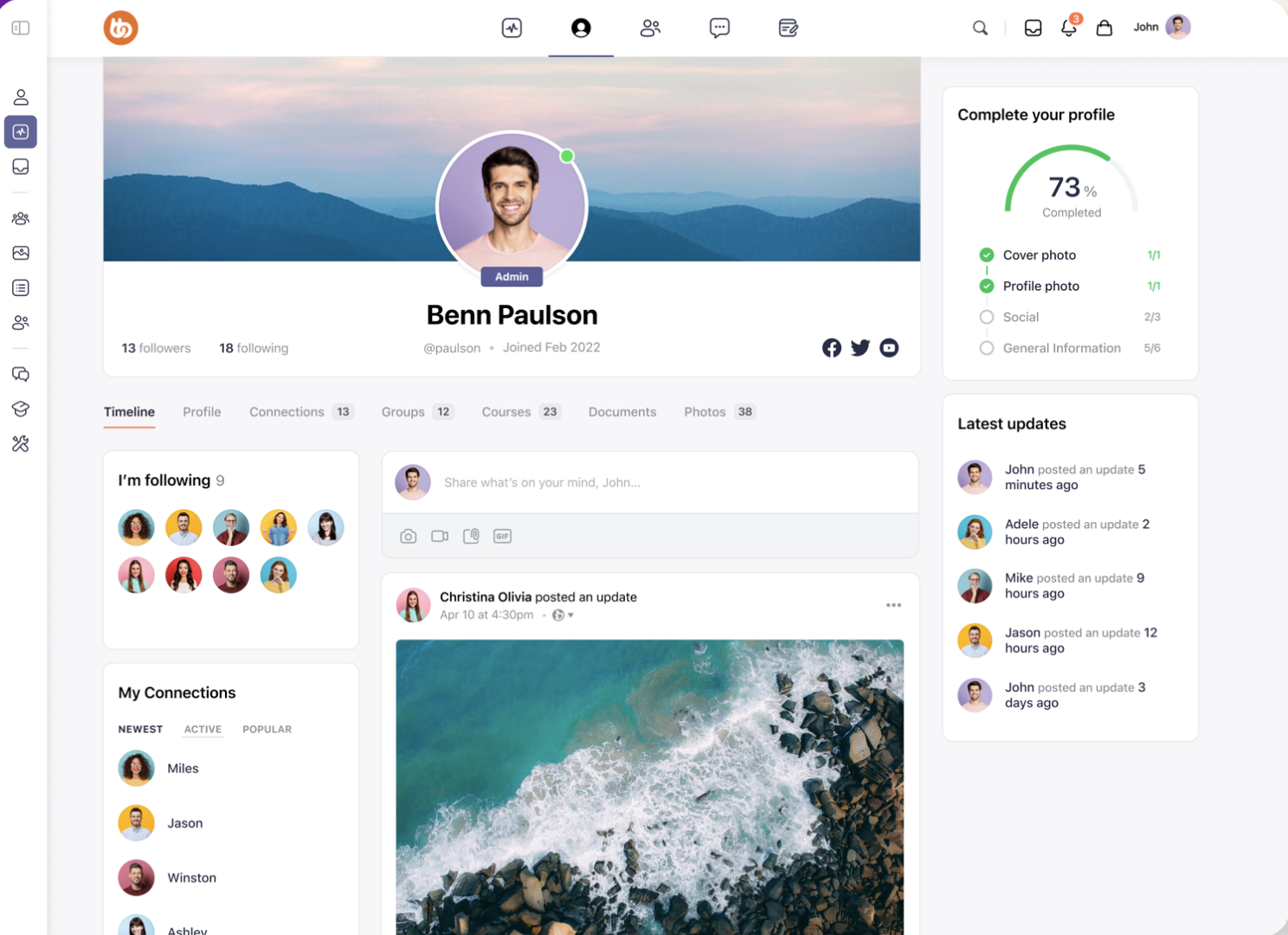
BuddyBoss takes a very different approach to most of the community platforms in this guide. Rather than hosting your community on a platform like Circle or Mighty Networks, BuddyBoss gives you the tools to build a social network directly on your own WordPress website.
That means you own your website, content, member data and community experience. BuddyBoss provides features such as member profiles, activity feeds, groups, forums, messaging, notifications, events and member directories, while WordPress gives you access to thousands of additional plugins and integrations.
The trade-off is that you are responsible for the WordPress setup and maintenance. This gives you much more flexibility, but it also makes BuddyBoss considerably more hands-on than a hosted community platform.
Why we like BuddyBoss
Complete control over your community and member data
Runs on your own WordPress website
Customizable member profiles and directories
Activity feeds
Social groups
Discussion forums
Private messaging
Notifications and live messaging
Events
Polls, reactions and post topics
Scheduled and pinned posts
Content and member moderation
Courses through integrations such as LearnDash, Tutor LMS and LifterLMS
Membership integrations
WooCommerce integration
Large number of WordPress integrations
Open-source platform
No algorithm controlling what members see
Optional branded mobile app
Where BuddyBoss stands out
BuddyBoss's biggest advantage is ownership and flexibility. You aren't building your community inside somebody else's social network or closed SaaS platform. Your website, members, content and data remain under your control, and you can customize the experience far beyond what is possible with many hosted community platforms.
It's particularly interesting for businesses that want to combine a community with a membership site or online school. You can use BuddyBoss for the social side of the experience and connect it with an LMS such as LearnDash, Tutor LMS or LifterLMS for courses. You can also connect it to membership, ecommerce, CRM and automation tools through the wider WordPress ecosystem.
The downside is that all that flexibility comes with extra work. BuddyBoss requires WordPress, and unlike a hosted platform, you're responsible for the underlying website and the plugins that make up your stack. The more functionality you add, the more important it becomes to manage compatibility, updates, performance and security.
It's therefore probably overkill for someone who simply wants to launch a community quickly. But for an organisation that wants to build a community as part of its own website and have complete control over the experience, that flexibility can be a major advantage.
Plans and Pricing
BuddyBoss has a free version of its platform, while the paid plans add the BuddyBoss Theme and premium features. Current introductory pricing is:
BuddyBoss Pro Price: $299/year for one site Includes the BuddyBoss Theme and Platform Pro, unlimited members, groups and courses, member profiles, activity feeds, forums, private messaging, media uploads, moderation, polls, custom reactions, topics and scheduled posts. It also includes integrations with popular LMS and membership platforms.
BuddyBoss Plus Price: $349 for the first year, then $599/year Includes everything in Pro, plus gamification features such as points, ranks, leaderboards, achievements and competitions. It also adds features such as domain restriction and additional performance tools.
There is also a BuddyBoss App for businesses that want a branded mobile app. The full app currently starts at $179/month when billed annually, while the Lite edition starts at $79/month annually.
Verdict
BuddyBoss is one of the most flexible options in this list, particularly if owning your community and having complete control over the platform is important to you.
Its combination of social networking features, groups, forums, messaging, memberships and course integrations makes it particularly powerful for businesses building a larger membership or learning ecosystem. And because it runs on WordPress, you can keep extending the platform as your requirements change.
However, that flexibility is also the biggest downside. BuddyBoss isn't as plug-and-play as a hosted platform, and you'll need to be comfortable with WordPress or have someone who can manage the technical side for you.
BuddyBoss is a great choice if you want to build your own community rather than rent space on somebody else's platform. If you want something you can set up quickly with less technical management, a hosted community platform will probably be a better fit.
Reign Theme - Best for Flexible WordPress Communities
Best for: Businesses, membership sites, course creators and organizations that want to build a highly customized community on WordPress.
Reign is a WordPress community platform and theme designed for businesses that want to build their own online community rather than use a hosted platform. It can be used for everything from social networks and membership sites to online courses, directories, job boards and marketplaces.
Reign now runs on Wbcom's BuddyNext community engine, which provides features such as member profiles, activity feeds, spaces, real-time updates and messaging without requiring BuddyPress. It also continues to support BuddyPress and BuddyBoss, giving WordPress users plenty of flexibility in how they build their community.
The big appeal is the amount of control you get. You can customise the design and then add functionality through Reign's integrations and WordPress plugins. The downside is that this is still a WordPress-based solution, so it requires more setup and ongoing management than a hosted community platform.
Why we like Reign
Highly customizable WordPress community
BuddyNext community engine
Support for BuddyPress and BuddyBoss
Member profiles and activity feeds
Groups and community spaces
Forums and discussions
Real-time community updates
Custom branding and layouts
Dark mode
Custom login and registration experience
Elementor page builder support
One-click demo imports
Integrations with popular LMS platforms
LearnDash, LifterLMS, Tutor LMS and Sensei support
WooCommerce, Dokan and WCFM marketplace support
GeoDirectory and WP Job Manager integrations
Multiple ready-made community demos
Can be extended through the wider WordPress ecosystem
Where Reign stands out
Reign's biggest strength is flexibility. It's much more than a standard community theme, allowing you to build a community alongside courses, memberships, ecommerce, directories or other types of content.
That makes it particularly interesting for businesses that have a more complicated vision for their community. For example, you could create a membership community with courses, a directory of members and a marketplace, all within the same WordPress website. Reign has dedicated integrations for a number of popular WordPress platforms, rather than expecting you to start from scratch.
The trade-off is that flexibility comes with complexity. You're still building on WordPress, so you'll need to think about hosting, plugins, updates, security and compatibility. If you just want to launch a community quickly, this can feel like a lot of work compared with a hosted platform where most of the technical infrastructure is taken care of for you.
Plans and Pricing
Reign has separate pricing for the theme itself and its larger add-on bundle. The theme has three licence levels, with annual or lifetime options.
Personal Plan Price: $99/year for 1 site Includes the Reign Theme, BuddyNext, community demos, customization tools, updates and one-to-one support. A lifetime license is also available for $249.
Professional Plan Price: $149/year for up to 5 sites Adds use across up to five community sites, staging and client builds, priority support and early access to new features. A lifetime license costs $349.
Agency Plan Price: $249/year for up to 20 sites Includes everything in Professional, with support for up to 20 sites and live chat for urgent issues. A lifetime license costs $599.
There is also a Reign Bundle, which includes the theme plus Reign's LMS, marketplace, directory and job-board add-ons. The Personal Bundle starts at $179/year, or $399 for a lifetime licence.
All annual licences include a year of updates and support, and Reign offers a 30-day money-back guarantee.
Verdict
Reign is a powerful option for businesses that want to build their community on their own WordPress website and have plenty of control over how it works.
Its biggest advantage is the sheer range of possibilities. You can start with a community and add courses, memberships, ecommerce, directories or other functionality as your business grows. The support for BuddyNext, BuddyPress and BuddyBoss also gives WordPress users plenty of flexibility.
However, I'd be cautious about recommending it to someone who simply wants an easy community platform. The WordPress approach means more setup and more responsibility for managing the underlying website and plugins.
Reign makes the most sense for businesses that want to build a community as part of a larger WordPress-based website. If simplicity and getting a community up and running quickly are the priorities, a hosted community platform will be considerably easier to manage.
Conclusion
When I started writing this article, I had a few clear areas I wanted to focus on: features, UX, branding and pricing. But more than anything, I wanted to understand how these platforms were actually using video to create better community experiences.
As a strong advocate for video, I believe the real power of video in a community comes from making it natural and spontaneous. Plenty of platforms, including Circle and Disciple, allow members to upload pre-recorded videos. That's useful, but I don't think it's enough.
If a member has to leave the platform, record a video somewhere else and then upload it, you've added friction to what should be a simple conversation. And the more effort you add, the less likely people are to actually participate.
Community video shouldn't feel like creating content for an audience. It should feel like talking to another person.
After reviewing 17 platforms, one thing became very clear to me: Swarm is the platform that comes closest to getting this right.
With Swarm, you can respond to a video with another video, creating genuine back-and-forth conversations between members. You can watch a video, respond when it suits you and continue the conversation without having to find time for another Zoom call or coordinate everyone's calendars.
That's what makes Swarm different. Video isn't simply something you upload to the community. It's part of how the community communicates.
And it's not just about video. Swarm brings video, voice, text, courses, events, memberships and live streaming together in one place, while giving community owners control over their branding and member experience. With its white-label options, your community can feel like your space, rather than another group living inside someone else's platform.
I think that's where community platforms are heading.
The platforms that win long-term won't necessarily be the ones with the longest feature lists. They'll be the ones that make it easiest for members to actually show up, participate and get to know each other.
After reviewing 17 platforms, Swarm was the one that made me feel most like I was interacting with real people rather than simply scrolling through another feed.
If you're ready to stop renting your audience on platforms you don't control, start a free 14-day trial of Swarm and see what your community could feel like when video is part of the conversation.



.png)
.png)


.png)



.png)